How To Setup GHL Sub-Accounts: Step-By-Step Guide For Agencies With Multiple Clients
Problem Every New GHL Agency Owner Is Facing
You've landed a few clients now. You're into GoHighLevel. But you're not sure what sub-accounts mean and how exactly they are supposed to work.
Should all content be created under one account? Should clients have separate logins? How much of the agency account content is carried over to clients' accounts, and how much of it must be replicated?
If you are facing these questions, rest assured that you are not the only one. Sub-account setup in GoHighLevel is the most common operational problem that GHL agencies face - and one of the worst documented topics of the whole platform.
This guide will help you figure everything out, including what are sub-accounts and how exactly you should set them up.
GoHighLevel Sub-Account - What It Is
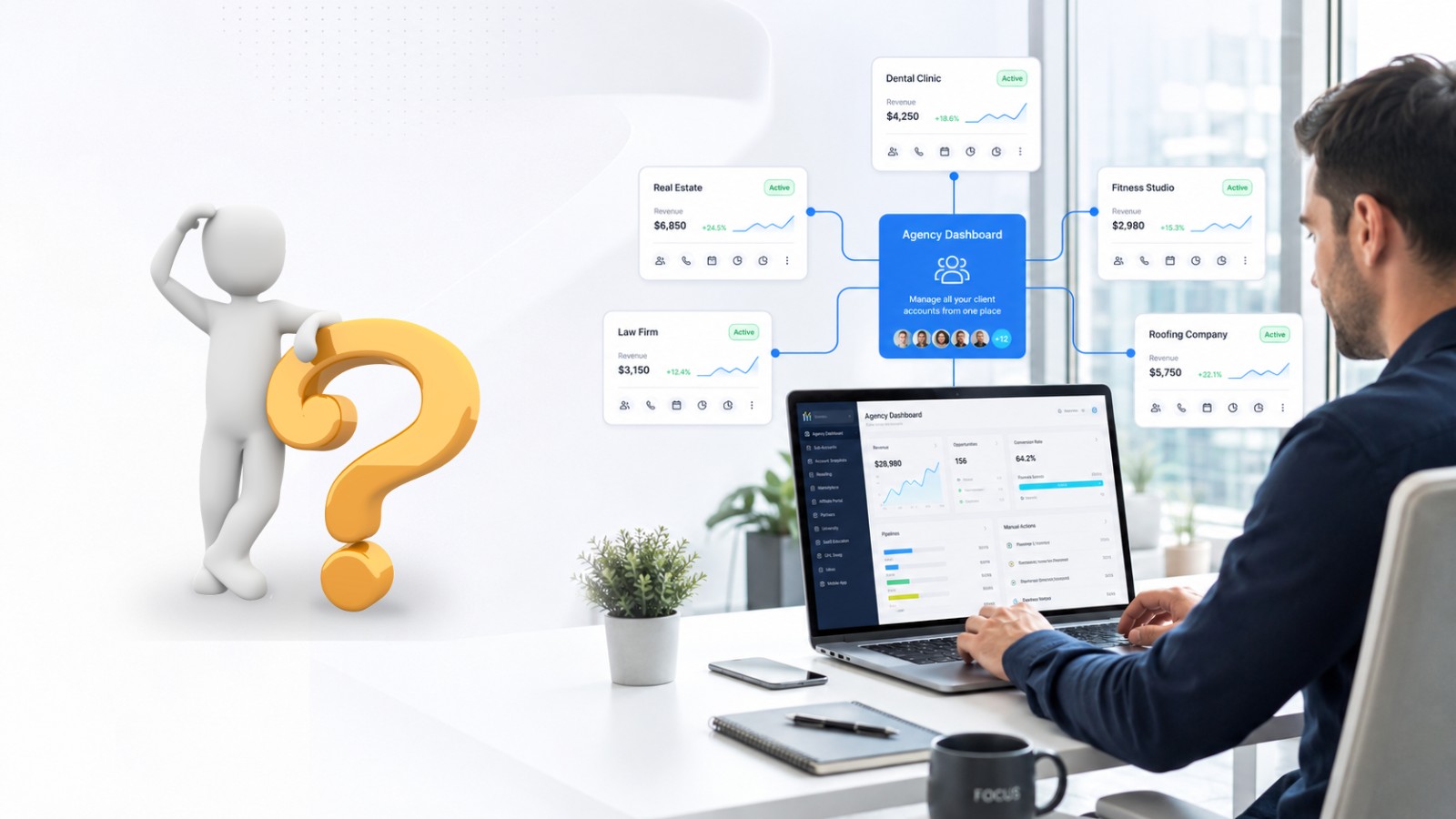
GoHighLevel Sub-Account is a distinct client environment that is created within your GoHighLevel agency account.
Imagine your agency account as a master control panel where every client that uses your services gets his own sub-account - his own CRM, pipelines, workflows, funnels, and contacts. Completely separate from all other clients' data.
You do everything at the top agency level, while your clients enter their sub-accounts and work exclusively with their own data there.
This is how GoHighLevel allows for multi-client management to be organized professionally and efficiently. Without it, organizing multiple clients in a single account is simply chaos.
Why Sub-Account Structure is Critical for Agencies
Setting up your GoHighLevel account structure in the correct manner from the get-go will prevent you from facing many issues later down the road.
The following issues arise from not having the proper sub-account structure within your GHL account:
Clients' data being mixed between campaigns
Workflow triggers firing on incorrect contacts
No ability to report on performance by client
Issues when trying to offboard a client without causing issues for the rest of the clients
Not being able to properly white label
Having an appropriate sub-account structure makes sure that each client has their own clean environment.
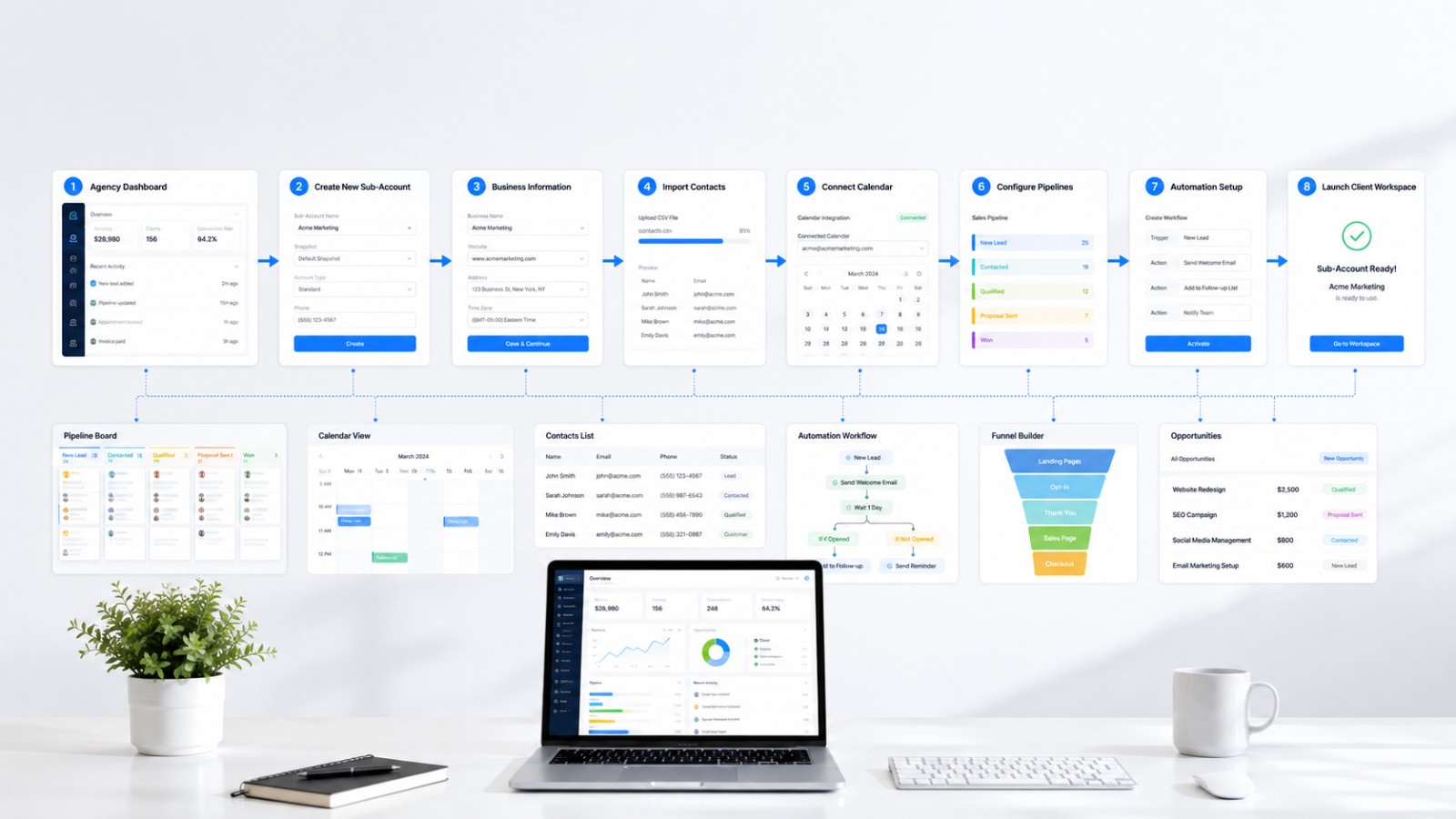
GHL Sub-Account Creation Process for Agencies Step by Step
Step 1 - Access Your Agency Dashboard
Login into your GoHighLevel account from an agency perspective. This is your master account that holds everything related to creation, management, and switching between all sub-accounts for your clients.
From your agency dashboard, go to Accounts that is in the left sidebar menu. This section contains all your sub-accounts and creates new ones.
Step 2 - Creating a New Sub-Account
Click on Create Sub-Account or Add Account depending on your GHL version.
There you will need to select one of the two options below:
Standard Account - for managed client business accounts
SaaS Account - for your clients using your white label SaaS plan
Choose the first option, Standard Account in most cases.
Step 3 - Add Client’s Business Details
Enter in the necessary details about the core business that will be using this sub-account:
Name of business (as the client uses it)
Business address and telephone number
Webpage link
Timezone – essential for scheduling purposes
Industry type
This information is necessary from the beginning to prevent any timezone problems with follow-up and to make sure the client’s profile is always clean.
Step 4 - Setup Sub-Account Settings
After creating the sub-account, log into it and set up the following:
Email and SMS Setup Add in the email address used by the client for sending emails and confirm it. Also, add in the phone number used for SMS services - a separate one purchased through GHL or their own business number if it is portable.
Calendar Settings Set up the client’s appointment schedule - available times, buffer time, appointment types, and confirmation messages.
Step 5 - Import Your Agency Snapshot
This is where efficiency kicks into overdrive. Rather than creating everything all over again for every new client, simply import your GoHighLevel agency snapshot into the new sub-account.
Navigate to Settings -> Snapshots in the sub-account and choose the appropriate snapshot. You'll have everything transferred: workflows, pipelines, funnel templates, email sequences, tags, and dashboards.
It takes 3 days to set up manually, but only 20 minutes when you have a good snapshot in place.
Step 6- Customize to Fit the Client
Once you've imported your snapshot, it's time to customize the elements unique to this particular client:
Customize workflow messages according to their business and offer
Set up their lead source, such as Facebook Ads, Google Ads, landing page forms
Set up custom pipeline stages if their process is different from your template
Customize the services/products in GHL to match
Create their availability and booking configuration
This step usually takes 2 to 4 hours per client after you've created a good snapshot.
Step 7 - Configure User Access for the Client
Set the level of access that the client has in their sub-account.
In the sub-account, navigate to Settings -> Team and add the client as a user. You can set a role for him which will define what he sees and modifies - protecting your workflows and automation logic while allowing him to be aware of his contacts, pipeline, and reports.
Typically, most agencies grant User-level access to clients, who have access to the conversations, contacts, and calendar, but not the workflow builder.
Step 8 -Test Everything Before Launching
Before handing over the sub-account or routing any live leads to it, do a full system testing:
Send in a test lead from every live lead source
Verify that the lead comes into the CRM with proper tags
Go through the full flow of follow-ups manually
Schedule an appointment test and ensure that confirmation and reminder are triggered
Ensure that the pipeline stages update properly
Ensure that the client’s dashboard displays correct information.
This step requires up to one hour but is important to avoid clients facing problems that ruin the trust immediately.
GHL Sub-Account Creation Check List
This should be done before marking the client's account as live:
Created sub-account with correct company info
Correct time zone selected
Correct email sending account linked
Phone number purchased and linked for SMS
Snapshot of agency created in sub-account
Customized workflow messages for this client
Connected all leads sources and tested them
Pipelines stages of CRM set correctly
Correct calendar with correct availability setup
Workflows for appointment confirmation and reminders working
Added client's user with correct access
Reporting dashboard is visible and showing correct data
Tested full lead in whole system
White labeling done for client pages
GHL Sub-Account Creation Common Errors to Be Aware Of
Using an incorrect time zone during setup the schedule will be determined by the sub-account time zone. Use the incorrect one and the follow-up messages sent to your client will go out at 3 AM rather than at 9 AM. Confirm the client's time zone before setting up an account.
Creating a sub-account without taking a snapshot Building each of your clients from scratch takes the most amount of time in agency operations. Taking a snapshot will make multi-client GHL management easier.
Giving clients excessive access Your clients can have access to the workflow builder and break all your automations. Make sure that you provide only the necessary permissions to your clients - contact information, conversation, pipeline, reporting.
Failing to test before deployment of a sub-account without prior testing is bound to be unsuccessful. Make sure that each of your touchpoints work correctly before deploying them for real leads.
Managing Multiple Sub-Accounts Effectively
Once you've passed the point of having more than five or six clients, managing multiple sub-accounts with GHL is going to need a strategy beyond simply making those sub-accounts.
What does an effective agency do?
Consistent naming of all sub-accounts - Client Name + Service Type
A master snapshot that gets updated anytime you change your core system
A GHL VA to manage sub-accounts on a daily basis
Monthly audit of sub-accounts to find broken workflows before your client finds them
GHL reporting at an agency level to track all the accounts at once
Those agencies running 20, 30, 50 or even more clients in GoHighLevel are not managing their business this way. They have a process and a team behind that process.
Conclusion - Nail the Structure and Everything Else Falls into Place
Sub-account setup may not be the most interesting topic in agency operations, but it’s definitely the most foundational one.
Nail the structure down, and everything else becomes easier - client onboarding will go much faster, service delivery will become more streamlined, and scaling your agency will be a breeze. Mess it up, and you'll be rebuilding, fixing, and apologizing to your clients for months.
Take the advice in this guide. Check the box off before each launch. Load a proper snapshot so you’re never starting from scratch again.
And if the technical details of GHL agency account setup are taking away from time you could be using to grow your agency, a GHL VA is precisely what you need.
👉 Need your GHL sub-accounts set up right from the start? Schedule a call now and let our team do the job - setting up your accounts, uploading snapshots, and doing the testing. Your next client will be onboarded in hours, not days.
FAQ
Q1. How many sub-accounts can be created within GoHighLevel?
The number of sub-accounts that can be created depends upon your GoHighLevel plan - almost all of the agency plans permit you to create unlimited numbers of sub-accounts.
Q2. Can each client sign in independently into their own GoHighLevel sub-account?
Yes - each sub-account has its own independent login access, and the clients will see only their own data and contacts without having access to your agency dashboard or other client accounts.
Q3. Do I have to build everything anew for every sub-account that is created?
No - importing a GoHighLevel agency snapshot into each new sub-account makes your entire pre-built system available within no time.